- An IVR routes callers through a menu you designed. A conversational agent lets them say the problem and can act on it. Each wins on different calls.
- Keep keypad IVR for fixed tasks such as language choice and keypad payments. Use an AI agent for lookups and questions that menus handle badly.
- Do not rip out the IVR. Point one option at an AI agent, keep a person one ask away, and judge it on resolution, not containment.
Conversational AI vs IVR: the short answer
An IVR routes a call through a menu you designed. A conversational AI agent listens to the caller's own words, checks your systems and can finish the task or hand over with context. Use the agent for varied questions and lookups. Keep keypad IVR for short, fixed tasks. Most teams should add the agent behind one IVR option, not replace the menu.
Disclosure: VoiceGenie publishes this post and sells conversational AI agents, so we are one of the options. We say below where an IVR is the better choice. For the full support picture, see our customer support page. This post goes deeper on the question a buyer typing this phrase has: which one should answer which call?
What each one does well
There are really three things people call "IVR" or "AI". Keypad IVR asks you to press a number. Speech IVR accepts a few spoken keywords, such as "billing" or "agent". A conversational agent accepts a full sentence, such as "my tent was due Monday and it has not come".
| Keypad IVR | Speech IVR | Conversational AI agent | |
|---|---|---|---|
| Caller says | Presses a digit | A keyword or short phrase | The problem, in their own words |
| Strong at | Fixed choices, language, entering a number or code | Routing by a few clear intents | Varied reasons, lookups, questions, simple actions |
| Weak at | Reasons not on the menu, long menus | Anything outside its word list | Calls that need authority or judgment |
| Behavior is | Same every time, easy to test | Mostly predictable | Flexible, so it needs testing and review |
| Effort to change | Edit the call flow | Edit the grammar | Edit the knowledge base and rules |
| Ends with | A routed call | A routed call | A finished task or a hand-off with a summary |
Menus have a real cost. In a 2019 survey of 2,010 US adults commissioned by Vonage, 61% said IVR gives a poor customer experience and 51% said they had abandoned a business after hitting an IVR menu [1]. That survey is old and vendor-funded, but its complaints are specific and still familiar.
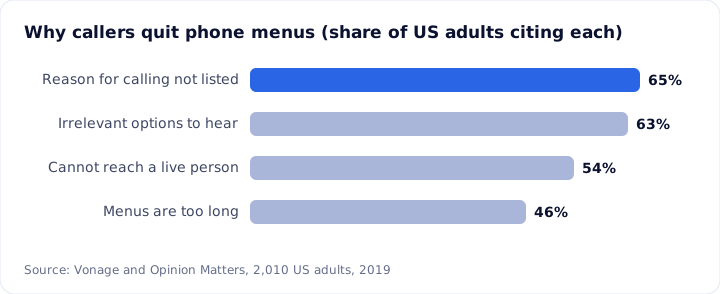
Self-service in general does not finish the job often. Gartner's 2019 survey of 8,398 customers found only 9% fully resolved an issue in self-service [2]. Callers still want the phone: 44% named it their preferred channel [2]. The pressure is real on the staffed side too. In 2024, US contact centers averaged 99 seconds to answer and abandoned 8.9% of calls [5].
An IVR is not the villain. A well-built menu with four honest options and a visible way out is fast, cheap and predictable. The problem is the 11-option tree built for your org chart, not your callers.
Which calls suit which
Sort by two questions. Does the caller know which option they need? Does the answer need judgment? The table is a starting point. Tag your own top ten call reasons for two weeks before you decide.
| Call type | Best fit | Why |
|---|---|---|
| Language choice, department pick with 3 or 4 clear choices | Keypad IVR | Fixed and fast. No reason to add AI. |
| Entering an account or PIN number on the keypad | Keypad IVR | Digits are reliable and private on a keypad |
| Order, case or appointment status | AI agent | One lookup, many ways to ask |
| Store hours, policy and "does it ship to Canada?" | AI agent | The answer is in a knowledge base |
| Reschedule or confirm an appointment | AI agent | Calendar lookup and a text confirmation |
| Returns and billing questions | AI starts, person finishes | AI gets the facts, a person approves exceptions |
| Complaints, cancellations, repeat callers | Person | Judgment and goodwill. Route on the first sentence. |
| Fraud, safety, caller in distress | Person | High harm. Transfer at once with a summary. |
One caution on complaints and technical calls. First-call resolution is lower for them even with people: SQM's 2022 benchmark puts complaints at 47% and technical calls at 63%, against 74% for general inquiries [4]. Do not start an automation project on the hardest calls.
Cost and set-up, honestly
I could not find a reliable public benchmark for IVR cost or for set-up time, and I will not quote vendors' own numbers. Here is what can be said.
Cost. IVR is usually priced by the platform or per port or minute, and the real cost is hidden: callers who leave, calls that reach an agent anyway, and the time to change the flow. Gartner put the average live contact (phone, chat, email) at $8.01 and self-service at about $0.10 [2], but the gap only helps if the self-service actually resolves the issue, and 9% did [2].
VoiceGenie's AI agents are usage based, at $0.14 per minute, billed per second. You bring your own carrier and numbers, so the phone line is on your carrier bill. Human agents are a per-seat license, see pricing. A 3-minute status call is 3 minutes of AI time. Compare cost per resolved call, including the transferred calls your team still takes. Put your own volumes in the calculator.
A worked example. Move the sliders to match yours.
AI at $0.14 a minute with volume credit applied, plus Insights seats for the people who take handed-over calls. Phone line charges are your carrier's and are not included. Illustration, not a quote. Open the full calculator
Set-up. An IVR change is a flow edit. An AI agent needs a knowledge base, a rule for checking identity, access to the system it reads, and transfer rules. VoiceGenie can be set up self-serve, or as a managed service where our team sets up and maintains the agents. The weeks go into testing and review, not connecting a number.
How to put an AI agent behind one IVR option
Do not rebuild your phone system. Add one option, forward it to an AI agent, and watch it.
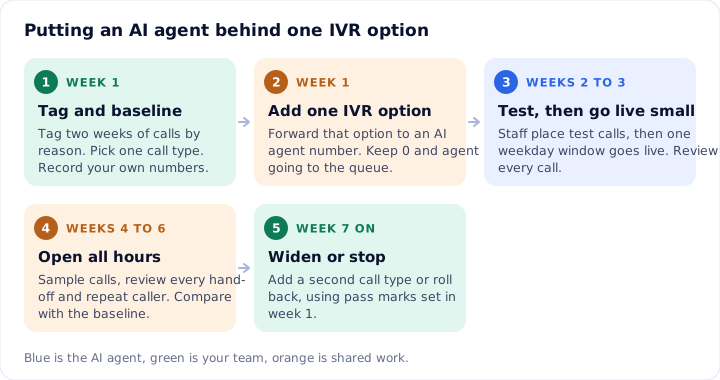
- Tag and baseline (week 1). Tag two weeks of calls by reason. Pick the call with one checkable answer, usually order or case status. Record your own repeat-call rate, abandonment and answer time.
- Add one IVR option (week 1). "Press 2 for order status" forwards to a number answered by the agent. Pressing 0 or saying "agent" still reaches your queue. VoiceGenie works with your own carrier or PBX, so this is a routing change.
- Test, then go live small (weeks 2 to 3). Staff place test calls, including bad audio, a wrong order number and an angry caller. Then turn the option on for one weekday window and review every call the next morning.
- Open all hours (weeks 4 to 6). Review a daily sample plus every hand-off and every caller who calls back within a week.
- Widen or stop (week 7 on). Add a second call type, or roll back, against pass marks you wrote in week 1.
Two things to set up. The AI announcement is a setting you switch on per agent, and it is off by default, so turn it on because callers should know. The recording notice is not a setting: write it into the agent's opening line.
What to measure
Measure whether the problem was solved, not whether a person was avoided. Containment counts a caller who hung up in frustration as a success. For the full scorecard, see our guide to measuring an AI voice bot.
| Measure | How to define it | Context |
|---|---|---|
| Resolution rate | In-scope calls where the need was met and no repeat call came within 7 days | Check by listening to a 100-call sample |
| Repeat contact rate | Same customer, same reason, within 7 days, any channel | At 71% first-call resolution, about 29% call back [4] |
| Transfer quality | Share of transfers a person confirms were needed, and share where the caller repeated themselves | Sample 20 a week |
| Abandonment and speed | Callers who hang up before an answer, and seconds to a voice | 8.9% abandoned and 99 seconds on average in US centers, 2024 [5] |
| Option drop-off | Callers who press the AI option and then press 0 within 30 seconds | A sign the agent is the wrong door |
| Wrong-answer count | Calls where the agent gave an answer your policy does not support | Target zero. Read these first. |
Take the baseline from your own phone system before the pilot. Published figures are context, not targets.
When IVR is still the right choice, and when VoiceGenie is not
Keep or choose an IVR when:
- The task is a fixed, short step. Language choice, a department pick, or keying in a number.
- The line has one purpose. A single-action line where a conversation adds nothing.
- You cannot yet read the system the answer lives in. An agent that cannot look up status will stall or guess. Fix the data first.
- A rule needs the same wording every time. A scripted notice can sit in a menu prompt.
Do not use an AI agent for fraud, complaints or advice, and do not use it as the only door.
On fit: VoiceGenie covers AI agents and a human desk on one record, and you bring your own carrier. It cannot use your own AI model, so if you need that, a different tool may suit you. Systems outside the built-in CRM list connect through the open API, webhooks or Zapier. VoiceGenie's security program is built to the SOC 2 Type 2, ISO 27001 and ISO 42001 standards, and it handles personal data in line with GDPR. Security documentation is shared on request. Rules on recording, disclosure and calling hours vary by country and state, so verify them with the official source for your market. To compare AI with other self-service, read AI voice agent vs chatbot, and for the basics, what an AI voice agent is.
Common questions
Is conversational AI better than IVR?
Not on every call. Conversational AI is better when callers have varied reasons and the answer sits in a system, such as order status. A keypad IVR is better for fixed, short tasks such as language choice or entering a code. Most teams do best with both, plus a quick route to a person.
Can I add an AI voice agent without replacing my IVR?
Yes. Add one menu option, such as order status, that forwards to a number answered by the AI agent. Everything else in the IVR stays as it is. Pressing 0 or saying agent still goes to your queue. VoiceGenie works with your own carrier and numbers, so the phone system does not change.
What is the difference between IVR and conversational AI?
An IVR plays prompts and takes keypad presses or a few spoken keywords, then routes the call. A conversational AI agent understands a caller's own words, checks your systems, and can finish the task or hand over with a summary. The IVR sorts calls. The agent can resolve them.
How much does a conversational AI agent cost compared with IVR?
IVR pricing varies by vendor and I found no reliable public benchmark. VoiceGenie's AI agents are usage based, at $0.14 per minute billed per second, and you bring your own carrier. Compare cost per resolved call, not per minute, and include the people who still take transferred calls.
Will callers hate talking to an AI agent?
Some will. Gartner's 2026 survey found 87% of customers say a way to reach a human is essential when companies use GenAI [3]. Keep that route open at every point, answer fast, and finish the routine call. Callers object less to automation that works than to a menu that traps them.
Sources
- Vonage and Opinion Matters, Vonage research reveals IVR horror costs businesses $262 per customer each year, 26 Sep 2019 (2,010 US adults)
- Gartner, Gartner Says Only 9% of Customers Report Solving Their Issue in Self-Service, 2019
- Gartner, Survey Finds 87% of Customers Say Companies Using GenAI Must Provide Access to a Human Agent, 4 Aug 2026
- SQM Group, What Is a Good First Call Resolution Rate?, 2022
- ContactBabel, US Contact Center Decision-Makers' Guide, 17th edition, 2025
About this post. The rules, prices and figures here were gathered from public sources and were correct to the best of our knowledge on the date shown. They change, and they differ by country and state. This is general information, not legal or financial advice. Before you act, check the latest position with the regulator or company concerned, using the links above. If you spot an error, write to support@voicegenie.ai.
Growth marketing manager at VoiceGenie. Writes about how businesses find, test and measure AI calling.
More posts by Ankita Sachdeva