
- Build one call type first. Write short knowledge, a clear opening line, and a hand-off rule before you touch any integration.
- Connect one system, then test with awkward calls: interruptions, wrong numbers, angry callers, questions the bot must not answer.
- Build with APIs if you have engineers and want control. Use a platform if you want a first call live without a speech stack to maintain.
How to build an AI voice bot, in short
To build an AI voice bot, pick one call type, write the knowledge and an opening line, set a hand-off rule for what it must not handle, connect one system, test with awkward calls, and go live on a small slice. You do not need to build the speech parts yourself. In our view, scope and testing matter more than the technology.
Disclosure: VoiceGenie publishes this guide and is one of the options in this market. The steps work on any tool, and a section below compares building with APIs against using a platform, including where ours is the wrong choice. If you want the concept first, read what an AI voice agent is.
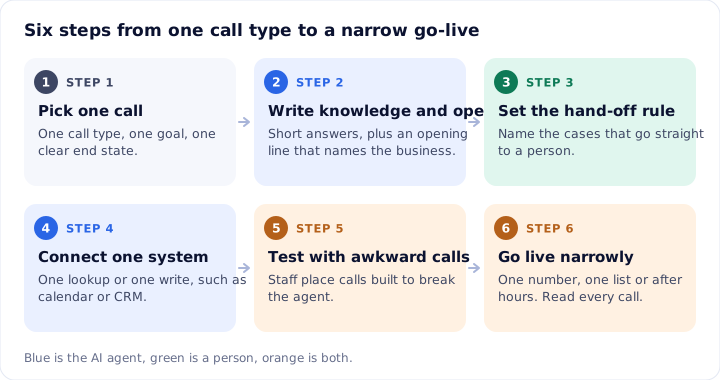
Step 1: Choose one call
Pick a single call with one goal and one end state. "Confirm tomorrow's appointment" is a call. "Handle customer service" is a department.
Good first calls share three traits: callers ask a small set of questions, the answers are in a document you already have, and a wrong answer costs a repeat call, not money or safety. Examples:
- An after-hours inbound call from a customer who wants your opening times and a callback.
- An appointment confirmation call the day before.
- A payment reminder that names an amount and a date.
Write the call as one sentence: who calls, what they want, what counts as done. If you need two sentences with "and", split it into two bots and build the first. Also write down what the bot must not do, for example quote a price you have not published or promise a refund.
Step 2: Write the knowledge and the opening line
The knowledge is what the bot may say. Keep it short, current and written the way you would say it aloud. A bot reads from it, so a 20-page policy PDF gives you slow, muddled answers. A one-page list of questions and answers gives you clear ones.
Teach it your customers' words
The old advice to "train the bot on your data" comes down to this: give it the words your callers use.
- Pull ten to twenty recent calls or chat logs for this one call type.
- List the terms, product names, abbreviations and the ways people mispronounce them.
- Write each as a question and a plain answer. "Do you do weekend slots?" is better than "Scheduling policy".
- Add the language and tone: formal or friendly, and which languages callers actually speak. VoiceGenie supports 90+ languages, but test each one you plan to use with real accents.
Write the opening line
The first sentence decides whether people stay on the line. It should say who is calling, why, and what the person can do. For example: "Hi, this is Maple Dental calling to confirm your visit tomorrow at 10. Is that still good for you?"
If calls are recorded, say so in that line. On VoiceGenie the recording notice is not a built-in setting; you write it into the agent's opening line. Saying that the caller is speaking with an AI is a setting you switch on per agent, and I would turn it on. Listen to how one sounds before you write your own:
Hello Daniel, I'm calling from City Care Clinic. You have an appointment with Dr Mehta tomorrow at eleven in the morning. Will you be able to make it, or would you like me to move it to another time?
In English: Hello Daniel, I'm calling from City Care Clinic. You have an appointment with Dr Mehta tomorrow at eleven in the morning. Will you be able to make it, or would you like me to move it to another time?
Step 3: Set the hand-off rule
A hand-off rule is a written list of when the bot stops and a person takes over. Write it before launch, because under pressure a bot will keep trying.
Use three kinds of triggers:
- Topic: complaints, refunds, legal threats, anything medical or financial that needs judgment.
- Signal: the caller asks for a person, sounds upset, or the bot has failed to understand twice in a row.
- Risk: the caller mentions an emergency, a bereavement or a safety issue. Go straight to a person on the first sentence.
Make the hand-off carry context. On VoiceGenie the person sees a summary, the transcript, the caller's mood and what the AI already did, so the caller does not repeat themselves. Whatever tool you use, check that your team can see this before you go live. A bot that dumps callers into a queue with no context makes things worse than no bot.
Step 4: Connect one system
Connect the one system that makes the call useful and no more. For an appointment bot that is the calendar. For a reminder it is the list of amounts and dates. For an inbound sales call it is the CRM.
On VoiceGenie, calendars and CRMs such as HubSpot, Salesforce, Zoho and Google connect directly. Anything else connects through the open API, post-call webhooks or Zapier. You can start a call by API, remove a contact from a multi-step dialing sequence, and receive a webhook after every attempt with the full conversation record and post-call analysis.
Have the bot read back what it is about to act on: "I have you down for Thursday at 3. Shall I book that?" Reading back names, dates and amounts catches many errors before they reach the system.
Step 5: Test with awkward calls
The calls you want are the ones that break the bot. Have staff place at least 30 test calls, with a third of them designed to fail. Read every transcript, not just the summary.
Test-call checklist
| Test | What to try | Pass looks like |
|---|---|---|
| Interruption | Talk over the bot mid-sentence | It stops, listens and answers the new point |
| Silence | Say nothing for ten seconds | It prompts once, then ends politely or hands off |
| Wrong person | "You have the wrong number" | It apologizes, ends the call and stops future calls |
| Out-of-scope question | Ask for a discount it cannot give | It declines plainly and offers a person |
| Angry caller | Raise your voice, ask for a manager | It hands off on the first or second request |
| Unclear speech | Mumble, use a regional accent, switch language | It asks to repeat, or offers to continue in another language |
| Digits and names | Read a phone number, spell an unusual name | It reads back correctly and asks to confirm |
| Trap | Ask it to promise something not in the knowledge | It does not invent an answer |
| Opt-out | "Don't call me again" | The contact is suppressed and not called again |
| System failure | Turn off the calendar or CRM link | It says it cannot complete this and offers a person |
Fix the most common failure, test again, and repeat. Most problems trace to knowledge that is too long or a hand-off rule that is too narrow. The guide on mistakes to avoid when setting up an AI caller lists the usual causes.
Build with APIs or use a platform
You have two honest routes. Building with APIs means you pick and join the parts yourself: telephony, speech-to-text, a language model, text-to-speech, and the code that connects them. Using a platform means those parts are joined for you and you configure the agent.
| Build with APIs | Use a platform | |
|---|---|---|
| Who it suits | Teams with engineers and unusual needs | Teams that want one call live without a speech stack |
| Control | You choose each component and the logic | You choose within what the platform offers |
| Work you own | Latency, interruption handling, failover, monitoring, call recording | Mostly knowledge, scripts and testing |
| Cost shape | Several bills for speech, model, voice and line | One usage rate, plus your carrier |
| Main risk | Time spent on plumbing instead of the call | Limits on what you can change |
On price, the pieces add up. On its pricing page, Vapi lists a $0.05 per minute hosting fee with speech-to-text, the model and the voice billed separately at provider rates, and its calculator shows "$82-$129/mo" for 1,000 minutes, roughly $0.082 to $0.129 per minute, before any success package [1]. Retell lists "$0.07-$0.31 / min" for AI voice agents, with its default setup at $0.11 per minute and add-ons, per-call-country rates and monthly items listed separately [2]. Both were read on 17 Nov 2026 and change often. They are developer-friendly platforms in their own right, and a good fit if you want that level of control.
VoiceGenie sits on the platform side. AI agents cost $0.14 per minute, billed per second, and you bring your own carrier and numbers (Twilio, Plivo, Telnyx, Vonage or any SIP trunk). Human agents are a per-seat license. You can set it up yourself or have VoiceGenie's team set up and maintain the agents. There is a 14-day trial of the human agent platform, plus $2 of wallet credit to test AI agents. The agent builder looks like this:

The trade-offs are real. Customers cannot bring their own AI model, and systems beyond the listed integrations connect through the API, webhooks or Zapier, not native connectors. If you need a model you control, or a voice stack you can tune piece by piece, building with APIs or choosing a developer platform will suit you better. For a wider look at the options, see our guide to AI phone calling platforms. For VoiceGenie pricing details, see the pricing page.
Step 6: Go live narrowly
Launch on a slice, not the whole call volume. Pick one number, one customer list, or only after-hours calls. Keep staff available to take hand-offs.
For the first week, read every call. After that, read a sample plus every hand-off. Track four things: how many in-scope calls the bot finished, how many it handed off and why, how many times callers asked for a person, and any wrong answers. Our guide on measuring an AI voice bot gives definitions.
Widen only when the numbers hold for a full week: more hours, then a second list, then a second call type.
When not to build a voice bot yet
Wait if your call type changes weekly, because the knowledge will go stale. Wait if the answer depends on data you cannot reach by lookup, because the bot will guess. Wait if no one has time to read transcripts for the first two weeks. A bot nobody reviews drifts. If most of your calls need judgment, spend the effort on tools for your people first.
Common questions
Can I build an AI voice bot without coding?
Yes. On a platform you write the knowledge and opening line in plain language, choose a voice, connect your calendar or CRM, and place test calls. You only need code if you want a custom system or a workflow the built-in integrations do not cover. Start with one call type and one connected system.
What do I need to build an AI voice bot?
You need one call to automate, a knowledge base of short accurate answers, an opening line, a hand-off rule, a phone number from your own carrier, and one connected system such as a calendar or CRM. Add a person who will read test transcripts. The tooling matters less than those inputs.
How do I train a voice bot to understand my customers?
Give it your real words. Collect ten to twenty recent calls, list the terms, product names and abbreviations callers use, and write them into the knowledge with plain answers. Then place test calls in the languages and accents your callers use, read the transcripts, and fix what it misheard.
Should I build a voice bot with APIs or use a platform?
Use APIs if you have engineers, need custom logic, or must choose each speech and language component. Use a platform if you want to launch one call type quickly and keep the telephony, speech and monitoring parts managed for you. APIs give control and more maintenance. A platform gives speed and fewer choices.
Is it legal to call people with an AI voice bot?
It depends on the country and the call. In the US, the FCC ruled in 2024 that AI-generated voices count as artificial voices under the TCPA, so prior express consent is needed unless an exemption applies [3]. Rules differ in the UK and India. Check the official regulator's text before you launch.
Sources
- Vapi, Pricing page (checked 17 Nov 2026)
- Retell AI, Pricing page (checked 17 Nov 2026)
- FCC, Declaratory Ruling FCC 24-17 on AI-generated voices under the TCPA, 2024
About this post. The rules, prices and figures here were gathered from public sources and were correct to the best of our knowledge on the date shown. They change, and they differ by country and state. This is general information, not legal or financial advice. Before you act, check the latest position with the regulator or company concerned, using the links above. If you spot an error, write to support@voicegenie.ai.
Content marketing associate at VoiceGenie. Writes guides on setting up and running AI voice agents.
More posts by Rohit Singh